




Updates für NCP Secure Entry Clients
Über diese Seite können Sie mit Ihrem erworbenen Update-Key einen neuen Lizenzschlüssel für den NCP Secure Entry Client generieren. Ein Update ermöglicht maximal zwei Versionssprünge. Falls Sie noch keinen Update-Key besitzen wenden Sie sich an Ihren Reseller:
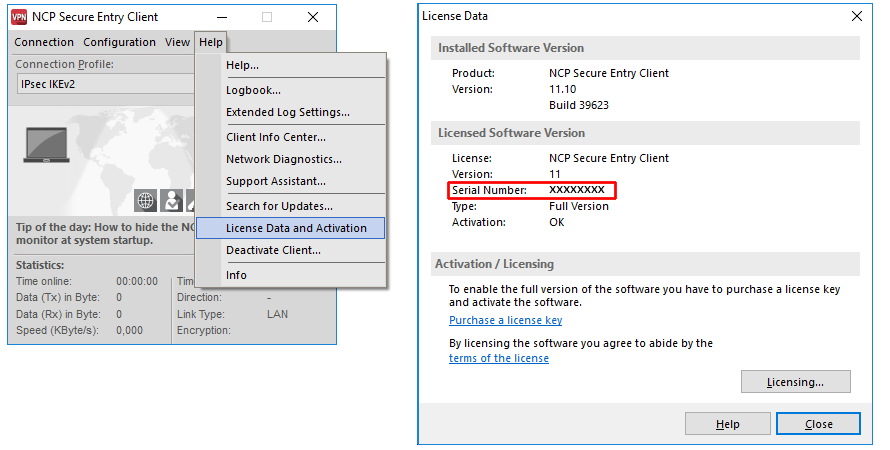
- Geben Sie die Seriennummer Ihres NCP Secure Entry Clients, den bestehenden Lizenz-Key und den Update-Key in die dafür vorgesehenen Felder ein (Eingabefeld siehe unten). Die Seriennummer finden Sie im Monitor-Menü des Clients unter "Hilfe Lizenzinfo und Aktivierung". Anschließend klicken Sie auf "Absenden".
- Der neue Lizenzschlüssel wird in der Antwortseite auf Ihrem Bildschirm angezeigt.
- Diesen Schlüssel übernehmen Sie dann in das Monitor-Menü des Clients unter dem Menü-Punkt "Hilfe Lizenzinfo und Aktivierung".
Update für mehrere Clients
Hier haben Sie die Möglichkeit, für mehrere NCP Secure Entry Clients (Seriennummern) gleichzeitig ein Update durchzuführen. Hierfür legen Sie bitte eine Text-Datei wie in dem am Ende der Seite beschriebenen Beispiel an und übertragen diese über das entsprechende Formularfeld an den Update-Server. Bitte beachten Sie die genaue Einhaltung des Datei-Formates (bitte keine Leerzeichen vor oder nach dem Komma einfügen), da ein Update sonst nicht erfolgreich durchgeführt werden kann. Sie erhalten in diesem Fall keine Fehlermeldung.