NCP Enterprise Client – Centrally Managed VPN Client for Windows, macOS, and Linux
NCP Secure Enterprise Client allows companies and public-sector organizations to deploy and manage secure VPN access across Windows, macOS, and Linux devices. Configurations, certificates, security policies, and updates can be managed centrally and distributed automatically, even across large and geographically dispersed environments.
NCP Secure Enterprise Client combines secure, straightforward remote access for users with efficient, centralized administration for IT teams. It is also easy to integrate with existing VPN infrastructures thanks to its standards-based architecture.



What is the NCP Secure Enterprise Client?
NCP Secure Enterprise Client is the end device component of the NCP Secure Enterprise Solution. As a software-based IPsec VPN client, it establishes a secure connection between a Windows, macOS, or Linux device and the corporate network. It also enforces centrally defined security and connection policies on the device.
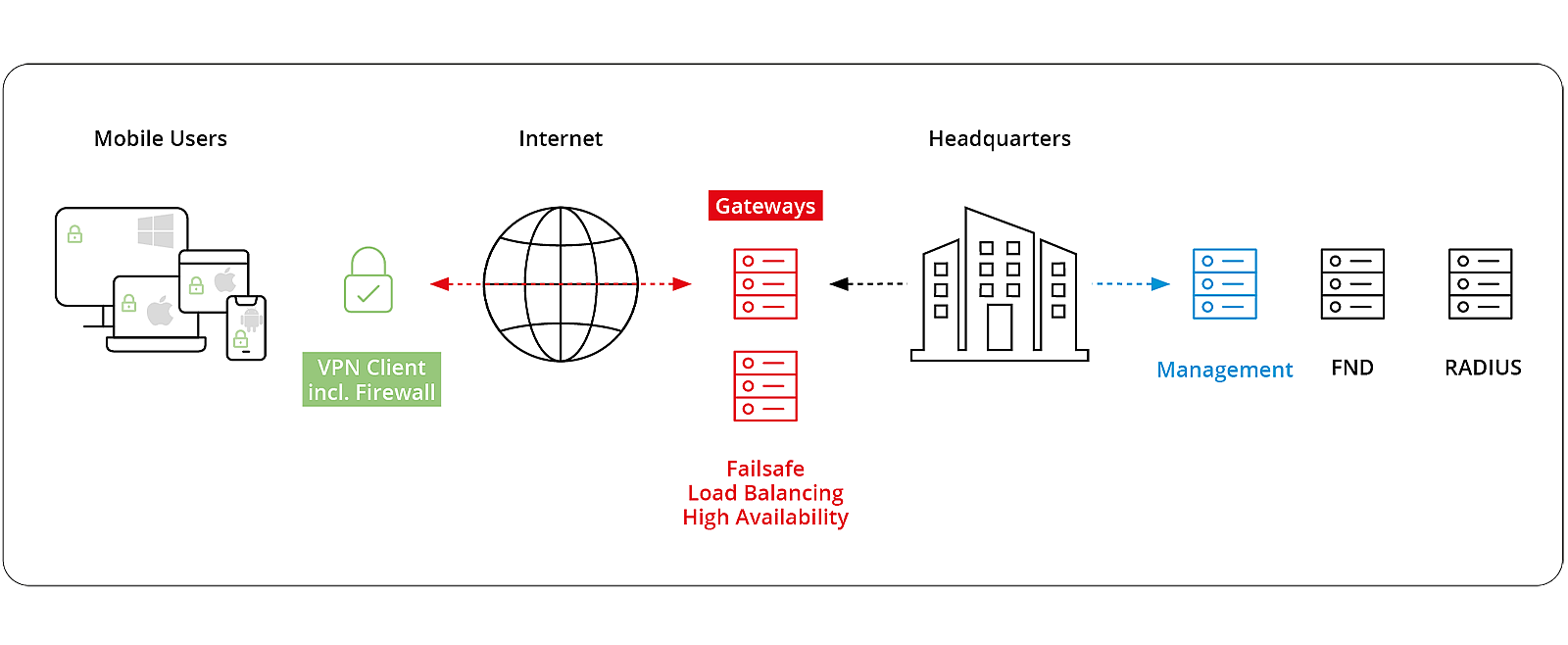
Within the complete solution, the client works with NCP Secure Enterprise Management for centralized administration and NCP Secure Enterprise VPN Server as the central VPN gateway. Support for standards-based IPsec means that the clients can also be used with compatible third-party VPN gateways.
Who is the NCP Enterprise Client for?
- Product type: Centrally managed IPsec VPN client
- Use cases: Secure remote access for large, distributed endpoint environments
- Suitable for: Companies, public-sector organizations, and other organizations with centrally managed remote-access infrastructures
- Management: Centrally through NCP Secure Enterprise Management
- Operating systems: Windows, macOS, and Linux
- Integration: Standards-based IPsec integration with existing VPN infrastructures
How does NCP Enterprise Client work?
NCP Secure Enterprise Client provides the secure connection between the end device and the corporate network. It establishes an encrypted VPN tunnel and applies centrally defined security and connection policies on the end device.
Depending on the operating system and configuration, it can also select the appropriate network connection and apply the required firewall rules. For users, the secure connection is established with minimal manual input, helping them access the resources they need without having to manage complex VPN settings.
NCP Secure Enterprise Clients are administered centrally through NCP Secure Enterprise Management. This allows IT teams to manage large, diverse endpoint environments consistently without configuring each device individually.
The benefits of NCP Secure Enterprise Client
NCP Secure Enterprise Clients combine strong endpoint security with a straightforward user experience, centralized administration, and flexible integration across all supported platforms.
Available features vary by operating system and configuration.
- Strong authentication: Support for certificates, one-time passwords, biometric methods, and multi-factor authentication helps protect access to corporate resources.
- Network Access Control: Endpoint Policy Checks verify the security status of an end device before network access is granted.
- FIPS 140-2: A certified cryptographic module supports organizations with enhanced security and compliance requirements.
- Centralized security policies: Security and access policies can be defined centrally through NCP Secure Enterprise Management and applied consistently across managed devices.
- Easy to use: One-click configuration and intuitive user interfaces make secure remote access easier in day-to-day use.
- Uninterrupted working: Supported clients can maintain a stable VPN connection when users move between LAN, Wi-Fi, and cellular networks.
- Automated updates: Configuration, software, and certificate updates can be deployed centrally.
- Centralized administration: Manage client rollout, configuration, updates, and ongoing administration through NCP Secure Enterprise Management.
- Cross-platform compatibility: Apply a consistent remote-access and security strategy across Windows, macOS, and Linux devices.
- Vendor-independent integration: Connect to compatible VPN gateways based on the IPsec standard.
- Flexible deployment: Integrate the clients with existing cloud-based and on-premises IT environments.
- Fully software-based: Deploy the clients without requiring additional VPN client hardware.
Features by operating system
Windows
NCP Secure Enterprise Client for Windows offers the broadest range of features across the three client versions. In addition to the shared enterprise capabilities, it provides a range of Windows-specific security, mobility, and usability features.

Windows Pre-Logon: Secure domain authentication before the user signs in to Windows locally

Dynamic Personal Firewall: Includes Friendly Net Detection, Secure Hotspot Logon, and Home Zone

Seamless Roaming: Maintains active application sessions when switching between LAN, Wi-Fi, and cellular networks

Automatic network selection: Selects the appropriate available network connection

Mobile connectivity: Supports 4G and 5G cellular connections

Budget Manager: Monitors connection time and data usage

Custom branding: Adds company logos and support information to the client interface

Operating system support: Windows 11, Windows 10
macOS
NCP Secure Enterprise Client for macOS extends the centrally managed enterprise solution to Apple devices, with support for both Apple silicon and Intel-based systems. Apple-specific capabilities such as macOS Keychain integration and biometric authentication help create a secure and familiar experience for Mac users.

Apple Certificate Store: Uses the macOS Keychain to manage device and user certificates securely

Biometric authentication: Supports biometric authentication for convenient, secure access

Native macOS experience: Provides a graphical user interface with an optional space-saving menu bar view

iPhone tethering: Establishes VPN connections using an iPhone’s internet connection

IPv4/IPv6 dual stack: Supports modern IPv4 and IPv6 network environments

High Availability Services: Supports load-balancing and failover scenarios within the NCP infrastructure

Operating system support: macOS 27 Golden Gate, macOS 26 Tahoe and macOS 15 Sequoia on Apple silicon and Intel-based systems
Linux
NCP Secure Enterprise Client for Linux is available exclusively as a centrally managed enterprise client. It is designed for organizations that need to integrate Linux workstations into a centrally administered remote-access infrastructure. In addition to centralized management, the Linux client provides capabilities for network security, access control, and diagnostics
Dynamic Personal Firewall: Centrally managed firewall with Friendly Net Detection, allowing security rules to adapt automatically to the current network

VPN Bypass: Allows selected applications, domains, or destination addresses to communicate outside the VPN tunnel

Multi-Certificate Support: Assigns different certificates to different VPN profiles

Network Access Control: Uses endpoint policy checks to prevent insufficiently protected devices from accessing the network

Advanced diagnostics: Provides log files and trace tools to help support teams identify and resolve issues
Custom branding: Adds a company logo or support information to a customizable banner

Operating system support: Ubuntu Desktop 22.04 and 24.04 with GNOME, and Fedora 41 and 42 with KDE, in 64-bit environments
Technical highlights
The following table compares key capabilities across the three client platforms:
| Feature | Windows | macOS | Linux |
|---|---|---|---|
| Centralized management through SEM | ✓ | ✓ | ✓ |
| Personal Firewall | ✓ | – | ✓ |
| Friendly Net Detection | ✓ | – | ✓ |
| Path Finder Technology | ✓ | ✓ | ✓ |
| Biometric authentication | ✓ | ✓ | – |
| Multi-Certificate Support | ✓ | ✓ | ✓ |
| Seamless Roaming | ✓ | – | – |
| Custom branding | ✓ | – | ✓ |
| FIPS 140-2 certified | ✓ | ✓ | – |

The Next Steps
Are you interested in centrally managing your remote access workstations and simplifying administrative processes?
We provide expert advice and support during the planning phase, along with tailored assistance when integrating the solution into your existing infrastructure. Our team offers technical support throughout the entire process, right up to the full deployment of your NCP Enterprise VPN environment.
Frequently asked questions
Find key information about the deployment, integration and centralized management of NCP Secure Enterprise Clients at a glance.
Not necessarily. NCP Secure Enterprise Clients use the IPsec standard and can work with a wide range of compatible VPN gateways. Existing VPN infrastructures therefore do not necessarily need to be replaced. However, certain NCP features, including Seamless Roaming and NCP Path Finder Technology, require NCP Secure Enterprise VPN Server as the remote gateway.
Yes. Free, fully functional 30-day trial versions of NCP Secure Enterprise Clients are available.
Yes. NCP Path Finder Technology automatically detects when standard IPsec communication is restricted and switches VPN communication to HTTPS port 443.
NCP Secure Enterprise Client for Windows supports seamless roaming. This allows the VPN tunnel to move automatically to another available network connection without interrupting the active application session. Users can therefore continue working when switching between Wi-Fi and cellular networks, for example.
NCP Secure Enterprise Clients support a range of strong authentication methods. These include certificates within a public key infrastructure, one-time passwords, and challenge-response methods. Biometric authentication is also available on Windows and macOS. The supported methods may vary depending on the operating system and infrastructure.
NCP Secure Enterprise Clients are available for Windows, macOS, and Linux. For the latest information about supported operating system versions, see the data sheet for the relevant client.
Yes. NCP Secure Enterprise Clients for Windows, macOS, and Linux can all be administered centrally through NCP Secure Enterprise Management. IT teams can manage clients running different operating systems within a shared remote-access infrastructure and centrally deploy configurations, certificates, updates, and other settings.
NCP Secure Enterprise Clients are designed for centrally managed deployments using NCP Secure Enterprise Management. For smaller installations that do not require centralized administration, NCP offers Secure Entry Clients for Windows and macOS. They are available from the NCP online store.
Yes. NCP Secure Enterprise Client supports a range of strong, multi-step authentication methods. Depending on the operating system and infrastructure, these may include certificates, one-time passwords, and biometric authentication.
Do you have questions?
Our team will be happy to advise you personally.
Dombuehler Str. 2, 90449 Nuremberg
+49 911 9968 333
sales@ncp-e.com